FlowCommerce
A self-initiated
e-commerce backend platform built
with
NestJS
and
PostgreSQL. It showcases a modern, scalable architecture with secure
JWT authentication,
RBAC, and
Stripe integration for payments.
Deployed through an automated
GitHub To Render CI/CD pipeline, this
project highlights clean backend design and production-ready
implementation.



Mini API Customer Flow Tester
Simulate the end-to-end API workflow directly in your browser.
1. Register / Login
2. Get Products
3. Add to Cart
4. Checkout
5. Payment
Stripe test mode — use 4242 4242 4242 4242
Mini API Admin Flow Tester
Test all admin-protected endpoints quickly.
1. Admin Login
2. Users (List All)
3. Categories
4. Products
5. Carts
6. Orders
Tech Stack & Vendors
All technologies used are production-grade and battle-tested.










Capabilities
- Authentication (Register/Login) & JWT Authorization
- Role-based Access Control (Admin/Customer)
- Products & Categories CRUD with validation
- Cart with quantity, totals, and stock checks
- Orders & Order Items (transactional)
-
Stripe Integration —
PaymentIntent +
/payment/webhookhandler - Cloudinary — media uploads via upload_stream
- Swagger — auto API docs
- Unit Testing For All Modules With Jest
- E2e Testing Example
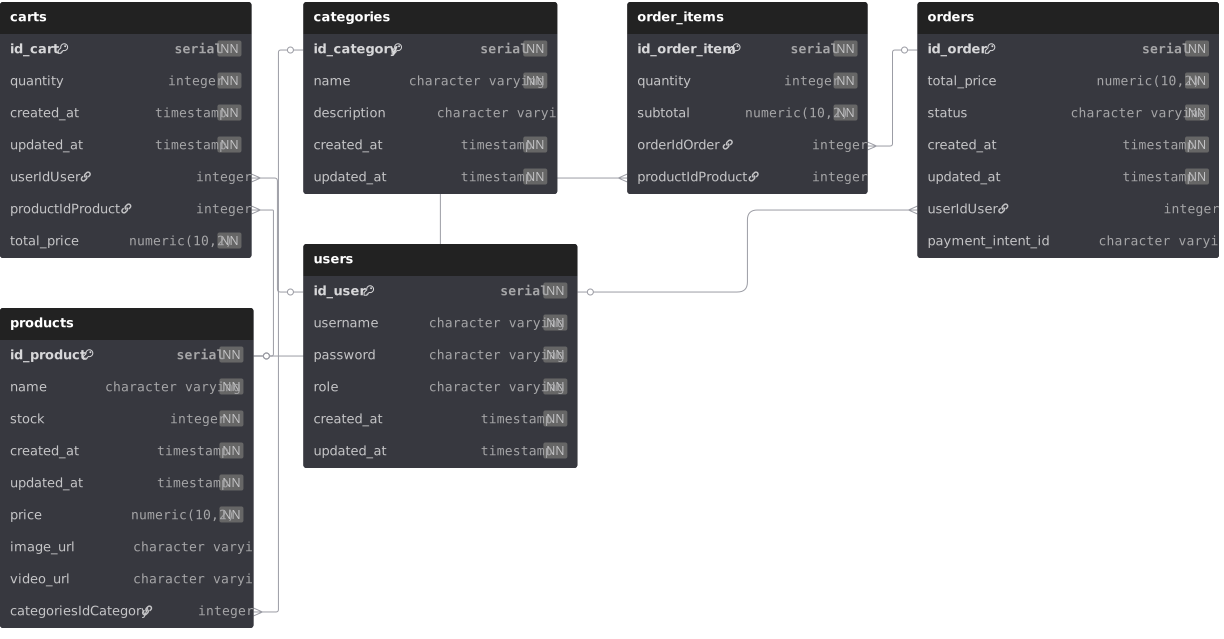
Entity Relationship Diagram (ERD)
Database schema visualization generated from PostgreSQL (Neon).
Folder Structure
flowcommerce/
├─ dist/
├─ node_modules/
├─ public/
├─ ├─ index.html
├─ └─ erd.svg
├─ src/
│  ├─ app.module.ts
│  ├─ main.ts
│  ├─ swagger.ts
│  ├─ auth/
│  │  ├─ auth.controller.ts
│  │  ├─ auth.service.ts
│  │  └─ jwt.strategy.ts
│  ├─ users/
│  │  ├─ users.controller.ts
│  │  ├─ users.service.ts
│  │  └─ users.entity.ts
│  ├─ categories/
│  │  ├─ categories.controller.ts
│  │  ├─ categories.service.ts
│  │  └─ categories.entity.ts
│  ├─ products/
│  │  ├─ products.controller.ts
│  │  ├─ products.service.ts
│  │  └─ products.entity.ts
│  ├─ carts/
│  │  ├─ carts.controller.ts
│  │  ├─ carts.service.ts
│  │  └─ carts.entity.ts
│  ├─ orders/
│  │  ├─ orders.controller.ts
│  │  ├─ orders.service.ts
│  │  ├─ orders.entity.ts
│  │  └─ order-items.entity.ts
│  ├─ payment/
│  │  ├─ payment.controller.ts
│  │  └─ payment.service.ts
│  └─ uploads/
│     ├─ uploads.service.ts
│     └─ upload.controller.ts
├─ test/
│  └─ ...
├─ .env
├─ package.json
├─ render.yaml
└─ tsconfig.json
Environment Variables Example
DATABASE_URL=postgres://user:pass@neon.host/db
JWT_SECRET=supersecretkey

STRIPE_SECRET_KEY=sk_test_***
STRIPE_PUBLISHABLE_KEY=pk_test_***
STRIPE_WEBHOOK_SECRET=whsec_***

CLOUDINARY_CLOUD_NAME=your_cloud
CLOUDINARY_API_KEY=your_key
CLOUDINARY_API_SECRET=your_secret
Tip: On Render, set these in Dashboard → Environment. On local,
create a
.env
file.
Useful Links & Endpoints
-
Stripe Webhook:
/payment/webhook -
Auth:
POST /auth/register,POST /auth/login -
Users:
GET /users,GET /users/:id_user -
Categories:
GET /categories,POST /categories -
Products:
GET /products,POST /products -
Cart:
GET /carts/me,POST /carts,DELETE /carts/me/clear -
Orders:
GET /orders/me,POST /orders/checkout